R-02 Copilot & Agents
SharePoint becomes Copilot's stage
SharePoint is where Copilot finds its content. Now SharePoint also becomes the place where Copilot builds content. Copilot in SharePoint is generally available, HTML pages are coming, the Page Agent is leaving. And agentic features cost credits.
Copilot in SharePoint and OneDrive is GA
Copilot in SharePoint and Copilot in OneDrive have been generally available since 30 September (MC1479277). The basic features from the preview stay in the Copilot license. New agentic features and work at scale run on Copilot Credits.
⚠️ Deadline 1 November 2026
The PowerShell opt-outs from the preview (KnowledgeAgentScopeand the related site lists) only apply until 1 November 2026. After that, you control Copilot through the site’s AI settings and Restricted Content Discovery.
Edit pages with Copilot in a targeted way
Authors now select individual sections or web parts before they ask Copilot (MC1478958). Copilot changes exactly there. Without a selection, Copilot still decides on its own.
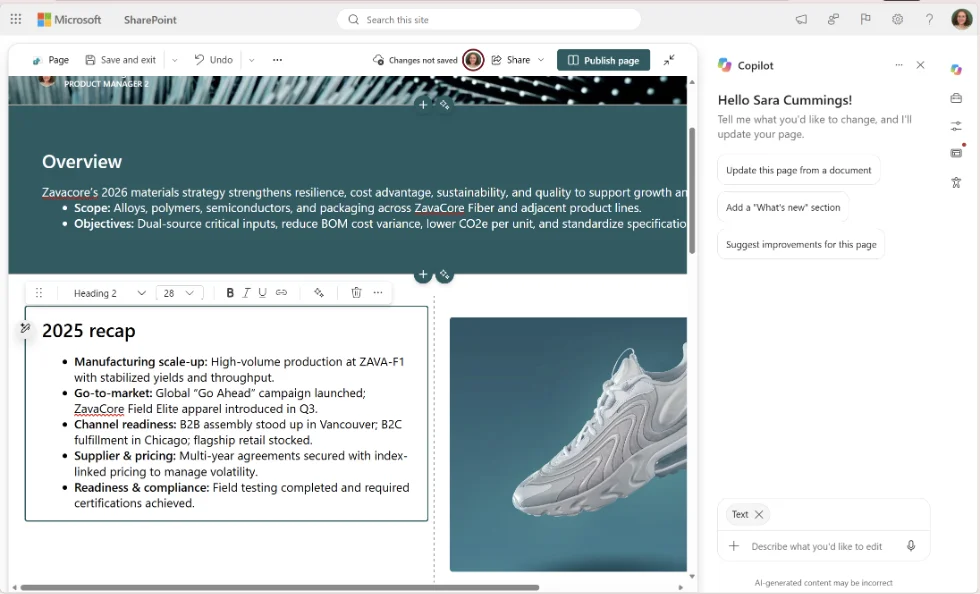 Select a section and let Copilot change exactly that part. Screenshot: Microsoft, MC1478958
HTML pages
Besides ASPX, SharePoint now supports HTML pages (MC1479517). Create them with Copilot, via + New > HTML page or by uploading an .html file. Public preview since early October, general availability rolls out from mid-November to late December.
Three details:
- Publishing does not grant any new permissions.
- HTML pages are allowed by default. Site owners control this with the “Allow HTML files” setting in the Site Pages library.
- The “Create agent” entry disappears from the + New menu on site pages. Agents are still created via library or list.
Goodbye, Page Agent
The SharePoint Page Agent (Frontier), which created pages from Copilot chats, is being retired between mid-October and mid-November (MC1481325). Its replacement is Copilot directly in SharePoint. Existing pages stay.
💡 Tip
You do not have to wait for the rollout to finish. AI admins can already disable the Page Agent in Agent 365 and set the pace of the switch themselves.
What stays
Free-form HTML pages are a big step. They open up creative freedom, and with it questions: who may do what, what will the intranet look like in a year, who maintains it? Governance for pages becomes a topic again.
☕ Espresso Moment: More freedom in latte art does not mean every cup turns out pretty. A few rules at the counter help.
Your takeaways
- Move preview opt-outs to site settings before 1 November
- Clarify who may use advanced SharePoint features via credits
- Test HTML pages in the preview and define guidelines
- Decide on which sites “Allow HTML files” should stay on
- Inform authors about the end of the Page Agent
Message Center posts: MC1479277, MC1478958, MC1479517, MC1481325
How are you tackling this in your tenant? Tell me on LinkedIn, I am curious about your experiences.
Share this note


Senior Modern Workplace Consultant at amexus, Microsoft MVP, author of “Microsoft 365 Administration für Dummies”.