R-02 Copilot & Adoption
Plugins, skills, Agent2Agent: agent governance becomes mandatory
In September, Microsoft published six Message Center posts about agents. On their own, they look like small updates. Together, they paint a clear picture: agents are becoming a construction kit, and the kit needs rules. One deadline already runs out on 25 October.
Plugins replace “Agents” and “Customize”
The new plugin registry (MC1484008) bundles agents, skills, connectors and MCP servers into one package. One plugin, usable everywhere: in Chat, Cowork, Code, Autopilot, Word, PowerPoint, Excel and SharePoint.
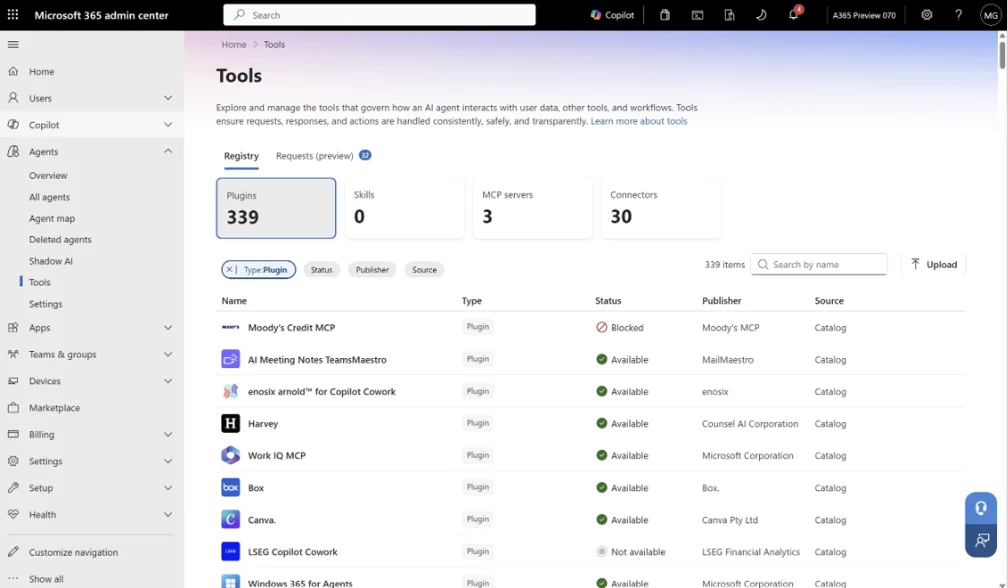 The new plugin registry in the Microsoft 365 admin center. Screenshot: Microsoft, MC1484008
For users this means: the “Plugins” button replaces “Agents”, “Agents & Skills” and “Customize”. The registry is rolling out now, and by the end of November users will find their agents under “Plugins”. Admins find everything in the admin center under Agents > Tools.
The deadline: who may upload advanced agents?
MC1472007 brings a new setting “Advanced package uploads” under Copilot > Settings. Advanced means: a declarative agent with actions or with an MCP server. Basic packages stay allowed.
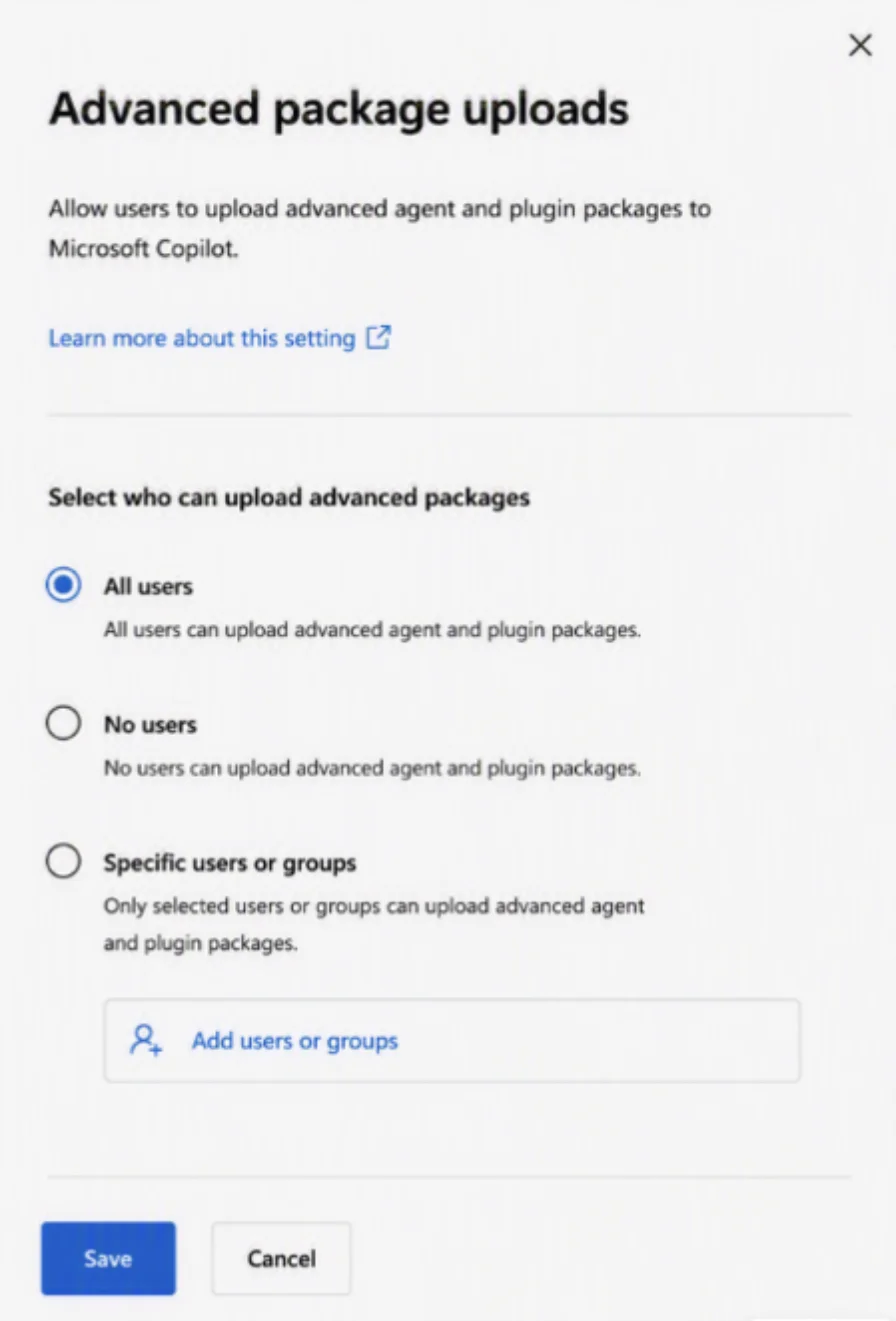 The upload rule for advanced packages with three options. Screenshot: Microsoft, MC1472007
You have three options: all users, no users, or specific users and Entra groups.
⚠️ Deadline 25 October 2026
If you do not make a decision by then, advanced uploads stay permanently allowed for everyone from that day on. Not clicking is a decision too.
Skills and Agent2Agent
- Skills in declarative agents are generally available (MC1476977). A skill bundles instructions, scripts and templates. Scripts run in a sandbox, sensitivity labels on skill files are preserved. Limitation: with Information Barriers this is not possible yet.
- Agent2Agent (A2A): Agent 365 agents with the A2A protocol can be embedded as connected agents into declarative agents (MC1478975). Only the admin may install them, via the “All agents” page in the admin center. In an agent’s detail view you see under “Connected agents” who it talks to.
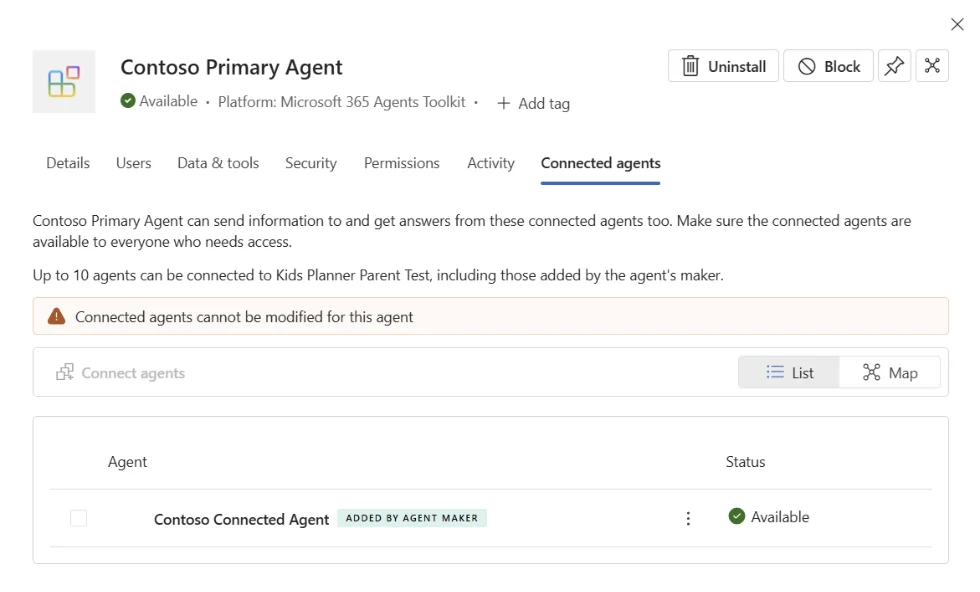 Under “Connected agents” you see who an agent talks to. Screenshot: Microsoft, MC1478975
A detail from the screenshot: up to ten further agents can be connected per agent.
Agents may write
- Federated connectors get create, update and delete actions in third-party systems (MC1476316). They run with the user’s permissions, and every action needs a confirmation: Cancel, Allow once or Always allow. In Researcher, connectors stay read-only. In the admin center you see per connector which read and write tools it brings, and you can disable it if needed.
- Azure DevOps via MCP: Copilot Deep Work analyzes work items and bugs through language (MC1479505). Via the setting “Azure DevOps data in Microsoft 365 Copilot” in the admin center you define who may do this: everyone, specific users and groups, or nobody.
What stays
Microsoft ships the controls: upload rule, admin install for A2A, confirmation for write actions. That is good. But the defaults are open, not closed. Whoever does nothing gets the full feature set for everyone.
☕ Espresso Moment: A portafilter machine with six brew groups is great. Without a barista who knows who pulls when, there is only chaos at the counter.
Your takeaways
- Set the upload rule for advanced packages by 25 October
- Define an approval process for plugins and skills
- Check connected agents in the admin center before approval
- Go through the read and write tools of the federated connectors
- Define ADO access for Copilot in the admin center
- Switch training materials to “Plugins”
Message Center posts: MC1484008, MC1472007, MC1476977, MC1478975, MC1476316, MC1479505
How are you tackling this in your tenant? Tell me on LinkedIn, I am curious about your experiences.
Share this note

Senior Modern Workplace Consultant at amexus, Microsoft MVP, author of “Microsoft 365 Administration für Dummies”.