R-02 Copilot & Agents
Chat, Cowork or Code? What is really behind Microsoft Copilot
Open Microsoft Copilot and take a close look. Top left, “Home” sits next to “Code”. In the message box, “Chat” sits next to “Cowork”. Two small switches that change more than any feature of the last two years. Behind them are three completely different ways of working with AI. And only one of them simply comes with your license.
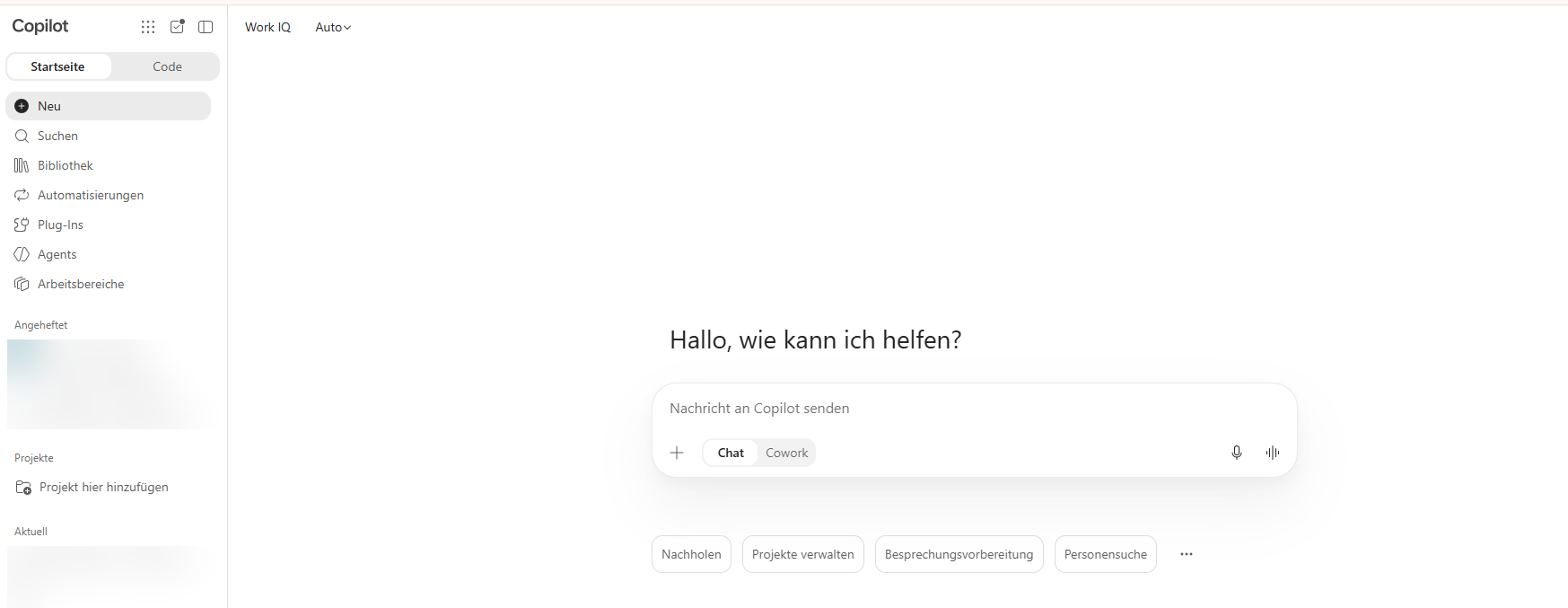
If you think you’ve seen this somewhere before, you’re right. Claude looks almost exactly the same by now. More on that later.
Copilot Home, the new starting point
With Copilot Home, Microsoft is rolling out a shared starting point for Chat and Cowork worldwide. The “Auto” setting recognises complex tasks and then recommends switching from Chat to Cowork. The context of your conversation comes along. At Ignite, Microsoft announced this recommendation as generally available.
Next to it, Code has its own area. Copilot Code is currently in the Frontier program, and at Ignite Microsoft announced general availability for “the coming weeks”. If you already see the tab, your tenant is in the Frontier program.
Three ways of working instead of three products
Forget the product names for a moment. At its core there are three ways to work with Copilot.
Talk. You ask, Copilot answers. Summarising, drafting, explaining. The result lands in the chat and you carry on working with it yourself. That’s Copilot Chat.
Hand it over. You hand over a task and Copilot works through it in several steps. Writing and sending emails, scheduling meetings, building Word, Excel and PowerPoint files, posting in Teams, creating folders in SharePoint and OneDrive. Microsoft describes the difference itself, quite soberly. Cowork completes multi-step work by acting on your behalf. Copilot Chat gives you content and insights within a single conversation.
Build. You have something developed that then runs on its own. A small app, a dashboard, an automation. That’s Copilot Code.
What is really behind Cowork
From the outside, Cowork looks like a chat with more patience. Technically, it’s something else entirely.
An agent that plans, acts and waits
Cowork breaks your task into steps and works through them one by one. You see the steps live and can pause, cancel or steer at any time. Before sensitive actions like sending an email or creating a meeting, Cowork stops and asks. For medium and high risk actions it even shows you a risk level. The approval button is then named after the action, “Send” or “Post”.
Be careful with the option to allow similar actions without asking again. It’s convenient. But it also means that for the rest of the conversation Copilot sends emails in your name without asking you again.
Skills, just like in Claude
Cowork comes with a whole set of built-in skills, including Word, Excel, PowerPoint, PDF, email, calendar, meetings, enterprise search and deep research. You create your own skills as a SKILL.md file in your OneDrive under Documents/Cowork/skills/, each in its own subfolder. If you’ve worked with Claude before, you’ll recognise the format immediately. If you upload a plugin package built for Claude, Cowork even converts it automatically.
On top of that there are plugins for Planner, Dynamics 365, Salesforce and others. And automations, meaning tasks that run on a schedule or react to an event, such as a specific email or a mention in Teams.
Several models, and you get a say
Cowork has a model picker and, next to it, a menu for reasoning effort, from Light to Max. Microsoft describes it as a trade-off between quality, speed and cost. You can choose models from OpenAI, from Anthropic and now also Grok from xAI. The most powerful Claude model, Claude Fable, was off by default as a preview and has to be enabled by an admin. With it, the provider retains prompts and responses.
For us in Europe this matters. Until now, Claude models were disabled by default in EU tenants because processing happened outside the EU Data Boundary. That is changing. Microsoft is moving processing into the EU Data Boundary in December and will switch Claude on from 9 December 2026 for all EU tenants that haven’t made a selection by then (MC1546438). What that means for admins is covered in my post on costs.
Your permissions, your data
Cowork works with your identity and your permissions. It sees exactly what you see. That sounds reassuring, and it is. But it also means that every overshared SharePoint site can now not only be read but actively processed. Oversharing was already a topic with Copilot Chat. With an agent that builds and sends documents from it on its own, it doesn’t get any smaller.
And Code?
Copilot Code is the workbench. It builds apps, dashboards and automations and runs either in the cloud or locally in a sandbox on your Windows machine. Locally the sandbox is mandatory by default, and if it can’t be set up, the work doesn’t start at all. Finished apps end up on the Copilot Managed Runtime, hosted in your Microsoft 365 environment.
For most end users, Code isn’t part of everyday work yet. It gets interesting for key users and power users who used to tinker with Power Apps. And for IT, which has to keep an eye on exactly those people.
Why the difference matters to you
On screen, Chat and Cowork are just one click apart. In effect, they’re worlds apart.
- Cowork acts in your name. Whatever goes out, goes out with your name on it. The responsibility stays with you, even if all you did was click “Send”.
- Cowork costs per task. Chat is included in your license. Cowork consumes Copilot Credits that your company pays for on top. You notice little of it day to day, your IT notices all the more.
- Cowork delivers files, not just text. The results land in OneDrive or SharePoint. That means they’re subject to the same permissions, labels and retention rules as everything else.
My rule of thumb for people without time.
- If you want to read a result, use Chat.
- If you want to have a result without clicking yourself, use Cowork.
- If you want something that then runs on its own, use Code.
Cowork pays off above all for tasks that come up often, are clearly described and whose result you can check quickly. For a quick summary in between, it’s too big and too expensive.
And what does this have to do with Claude?
Quite a lot. Microsoft built Cowork in close collaboration with Anthropic and, according to its own announcement, integrated the technology behind Claude Cowork. In September 2026 Anthropic merged Chat and Cowork into a single Claude. Claude Code remains a separate product there, just like Code at Microsoft.
One difference I find interesting. Microsoft lets you flip the switch between Chat and Cowork yourself, Auto only suggests the switch. Claude got rid of the switch and decides on its own whether a task needs more than a conversation. One is more transparent, the other more convenient. With Microsoft you know when it costs credits. With Claude you notice it in your subscription’s allowance, which Chat and Code share.
My take
I’m collecting my own first experiences with Cowork right now. A few things already work really well. I have new colleagues invited to our monthly calls automatically. Cowork first checks who has which role and which call fits. And Cowork sorts my downloads into a filing system in OneDrive that I built for exactly that purpose.
I had Cowork build the presentation for my M365 news show twice. Honestly, in the end it was too expensive for me. The allowance in my test tenant ran out so fast that I spent more time thinking about credits than about the presentation. And that’s exactly where it gets hard for end users. We have a chat, we have AI, suddenly Code shows up, and nobody really knows what to do with it.
I think the direction is right. Nobody wants to think about which tool fits before every task. What bothers me is the pace. Home, Cowork, Code, workspaces, automations, plus five models with fantasy names and a billing model that seems to change every quarter. For an end user who has only just learned that Copilot Chat exists, that’s a lot at once.
And one piece of advice to take with you. Let Copilot research, structure and prepare. But read what goes out in your name. You can tell when an email only comes from the machine.
How your admin sets up Cowork, keeps costs under control and what is coming for EU tenants on 9 December is covered in Cowork costs extra. How to control Copilot Credits as an admin.
☕ Espresso moment: Whether you grind the beans yourself or let the bean-to-cup machine do it is your call. Only the machine bills you for every cup.
Your takeaways
- Copilot has three ways of working. Chat to talk, Cowork to hand things over, Code to build.
- Copilot Home brings Chat and Cowork together, and Auto recommends switching for complex tasks.
- Cowork acts in your name and asks before sensitive actions.
- You create your own skills as
SKILL.mdin OneDrive, in the same format as in Claude. - Cowork consumes Copilot Credits, Chat doesn’t.
- From 9 December 2026, Claude models are on by default in EU tenants that haven’t made their own selection.
Are you already using Cowork, or is your switch still set to Chat? Tell me on LinkedIn what you use it for.
Share this note

Senior Modern Workplace Consultant at amexus, Microsoft MVP, author of “Microsoft 365 Administration für Dummies”.